> For clean Markdown of any page, append .md to the page URL.
> For a complete documentation index, see https://developer-stage.shipbob.dev/llms.txt.
> For AI client integration (Claude Code, Cursor, etc.), connect to the MCP server at https://developer-stage.shipbob.dev/_mcp/server.
# Tracking
## Retrieving tracking and fulfillment details
There are two primary options for retrieving shipment details from ShipBob.
### Option 1 – Webhooks
ShipBob has the ability to fire webhooks for certain shipment events. The topics that can be subscribed to are:
* Shipped event
* Delivery event
* Shipment exception event (such as a product being out of stock)
* Shipment On Hold event (such as an invalid address)
* Shipment cancelled event
Here is a high level overview:
```mermaid
sequenceDiagram
title order.shipped webhook
participant Client as Your System
participant ShipBob as ShipBob
Note over Client,ShipBob: 1. One-time setup
Client->>ShipBob: Subscribe to order.shipped webhook
(Dashboard or API)
Note over Client,ShipBob: 2. When an order ships…
ShipBob->>Client: POST your-webhook-url
→ order.shipped event
(includes tracking number(s), carrier, shipment details)
Client->>Client: Update order status to Shipped
Save tracking number & link
Client-->>ShipBob: 200 OK
Note right of Client: Done – instant sync!
No polling needed
```
A couple critical pieces to note:
* Each topic can be subscribed to in the ShipBob dashboard by going to **Integrations** > **Webhooks** > **Add Subscription**.
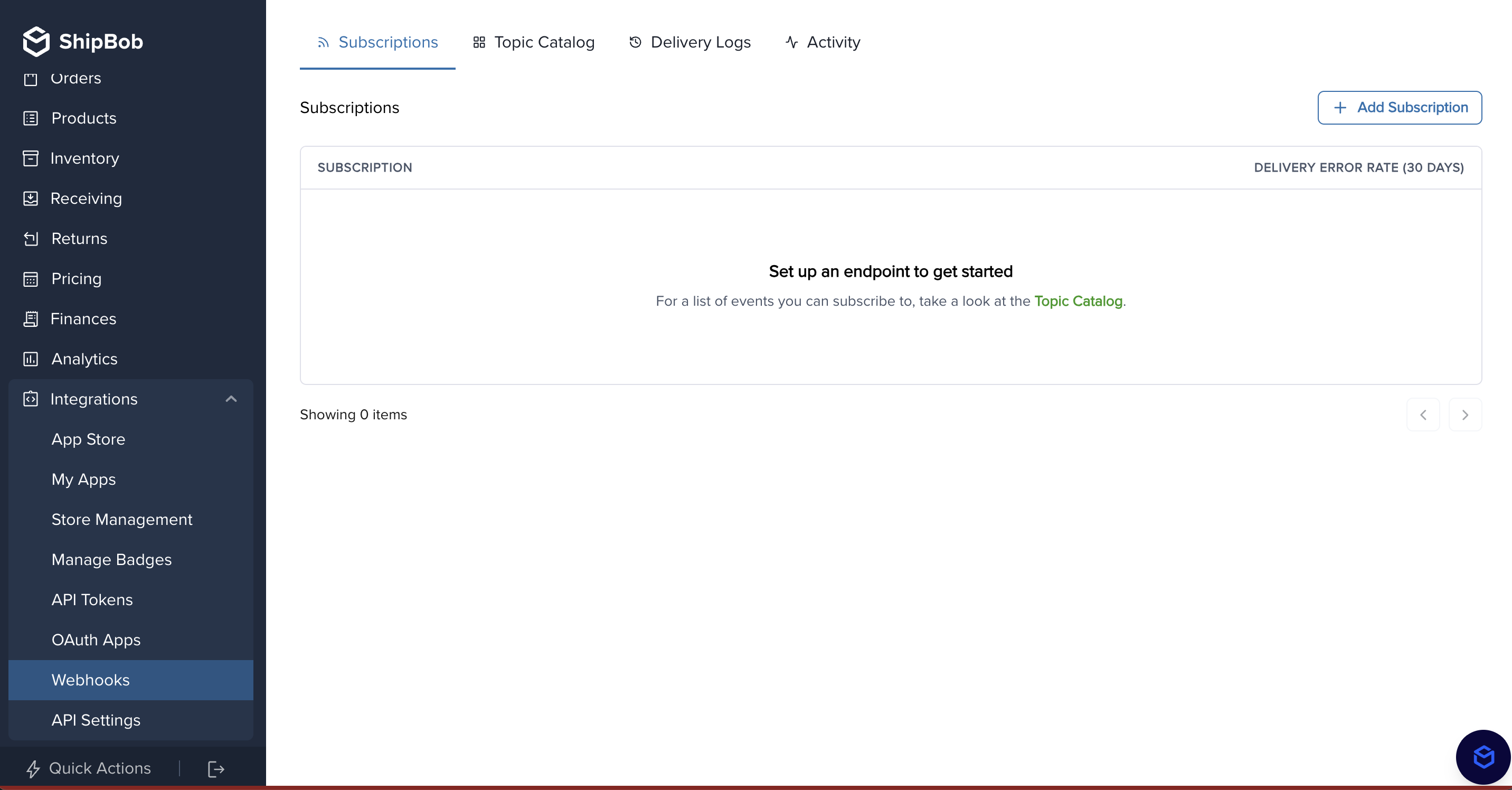
* You can also subscribe to webhooks via API. Request details can be found [here](/api/webhooks/create-subscription).
* Learn more about ShipBob webhooks [here](/webhooks).
### Option 2 – Polling-based approach
This method allows you to fetch tracking details from ShipBob on demand using the [GET Orders](/api/orders/get-orders) endpoint. There are several parameters to choose from depending on your use case, but the most common params used are:
* **`HasTracking`** – this will filter orders only where tracking information has been made available (i.e. the order has shipped).
* **`IsTrackingUploaded`** – this is a query parameter you can use as a 'checker' on your end. If false, you will know you have not synced to your system.
* **`Limit`** – we recommend setting this to the maximum limit of 250 as the default will return only 50 orders.
Here is a sample request: `https://api.shipbob.com/2026-01/?order?HasTracking=true&IsTrackingUploaded=false&Limit=250&Page=1`
Sync tracking numbers back to your system using the polling-based approach.
* **Endpoint**: `GET https://api.shipbob.com/2026-01/order?HasTracking=true&IsTrackingUploaded=false`
* **Optional Parameter**: Add `&limit=250` for up to 250 results.
* **Header**:`Authorization: Bearer `
* **Response Example**:
```json highlight={8-13}
[
{
"id": 234567890,
"reference_id": "101",
"shipments": [
{
"id": 100000001,
"tracking": {
"carrier": "OnTrac",
"tracking_number": "D10010000000000",
"carrier_service": "Ground",
"tracking_url": "https://www.ontrac.com/tracking/?number=D10010000000000"
}
}
]
}
]
```
####
* Each order can have 1 or many shipments
- Extract the `tracking_number` from each shipment in the shipments array and update your system.
* **Endpoint**: `POST https://{env}.shipbob.com/2026-01/shipment:batchUpdateTrackingUpload`
* **Header**:`Authorization: `
* **Body**:
```json
{
"is_tracking_uploaded": true,
"shipment_ids": [100000001, 100000002, 100000003]
}
```
* Poll every 15 to 30 minutes to stay updated.
Here is a high level overview:
```mermaid
sequenceDiagram
participant Client as Your System
participant ShipBob API
Client->>ShipBob API: POST /order (Create Order)
ShipBob API->>ShipBob API: Pick, Pack and Label Order
alt Polling-Based Tracking Sync
Client->>ShipBob API: GET /order?HasTracking=true&IsTrackingUploaded=false
ShipBob API-->>Client: Returns Orders with Tracking
end
Client->>Client: Sync tracking number in the system
Client->>ShipBob API: POST /shipment:batchUpdateTrackingUpload
```
You also can specify a **`shipbob_channel_id`** header parameter. It is advised to pass this parameter for the channel you have write access to, so you only retrieve order and shipment details from orders that were created from your integration. Excluding the channel id will be a global search across all channels for the Merchant, which has the possibility to retrieve order details from other sources/integrations a merchant has installed that you may not need.
If your platform supports split orders/shipments, you will need to refer to the multiple shipment objects returned in the API response in the event that an order has been split.
Within the order response, you will see an array of shipments. An order can have a one-to-many relationship to shipments if the order has been split. Each shipment associated with an order will have a unique tracking number and will detail which products have been packed and shipped as part of that individual shipment.
Each shipment will also have a status. When a shipment has tracking details, the shipment status will be `LabeledCreated`. This status will quickly move to `Completed`. If you have a use-case that requires you to look at specific ShipBob statuses, it is recommended to use both statuses when checking for tracking details from ShipBob.
To see more detail on other statuses you may encounter, please refer to our documentation [here](/status-reference).
## Supported carrier identifiers
If you need to setup carrier mapping to map carrier names from ShipBob to your system, here is a list of how each carrier shows up in the ShipBob API:
| ShipBob Carrier Identifier | Carrier Name |
| ----------------------------------- | ----------------------------------- |
| ACILogistics | ACI Logistics |
| Amazon Shipping | Amazon Shipping |
| Amazon Shipping UK | Amazon Shipping UK |
| APC LAX | APC LAX |
| APC NJ | APC NJ |
| APC ORD | APC ORD |
| APG eCommerce | APG eCommerce |
| Asendia | Asendia |
| Australia Post | Australia Post |
| AustraliaPost | Australia Post |
| BetterTrucks | Better Trucks |
| CanadaPost | Canada Post |
| CirroECommerce | Cirro |
| CouriersPlease | Couriers Please |
| DaiPost | Dai Post |
| Deutsche Post International Tracked | Deutsche Post Int'l Tracked |
| DHLeCommerce | DHL eCommerce |
| DHL Express | DHL Express |
| DhlEcs | Dhl Ecs |
| DPDUK | DPD UK |
| EPOSTGLOBAL | EPost Global |
| Evri Household Delivery | Evri Household Delivery |
| FedEx | FedEx |
| FedExSmartPost | FedEx Smart Post |
| GLS EconomyParcel | GLS Economy Parcel |
| OnTrac | OnTrac |
| OSMWorldwide | OSM |
| Passport | Passport |
| PrePaid | PrePaid |
| PrePaid Freight | PrePaid Freight |
| Royal Mail International Parcel | Royal Mail Int’l Parcel |
| Royal Mail Tracked 24 | Royal Mail Tracked 24 |
| Royal Mail Tracked 24 - High Volume | Royal Mail Tracked 24 - High Volume |
| Royal Mail Tracked 48 | Royal Mail Tracked 48 |
| Royal Mail Tracked 48 - High Volume | Royal Mail Tracked 48 - High Volume |
| RoyalMail | Royal Mail |
| ShipBob | ShipBob |
| ShipBob Freight | ShipBob Freight |
| Spring Tracked | Spring Tracked |
| UniUni | UniUni |
| UPS | UPS |
| UPSMailInnovations | UPS Mail Innovations |
| UPSMI | UPS MI |
| UPSSurePost | UPS SurePost |
| USPS | USPS |
| Veho | Veho |